
- Aug 3, 2025
- 338
- 0
The smartphone flash tool is used to flash any MediaTek (MTK) smartphone.
It is one of the best tools for Android smartphones.
It helps a lot when we are having issues with our smartphones. There are many uses of the SP Flash Tool.
What Can You Do with The Smartphone Flash Tool
Downgrade or Upgrade your phone
You can use the SP flash tool to flash the stock ROM to downgrade your smartphone or upgrade your phone to Android KitKat, Lollipop, Marshmallow, Nougat, Oreo, or later. It depends on the release of the firmware or your choice if the option is available.
Unbrick any smartphone.
Like we said before, you can use SP Flash Tool to completely unbrick any bricked smartphone. Smartphones can be bricked in the process of rooting or flashing a custom firmware, ROM, or recovery.
Unroot any phone.
You can also use your smartphone's stock firmware to completely unroot any smartphone. You can also regain your warranty by properly flashing the official stock firmware. It can be done by reverting to the official stock firmware of your phone if your smartphone has been tampered with.
Fix Issues on your smartphone.
Your smartphone might develop an issue that might be unknown to it you, if it a software-related issue, you can restore and fix it by flashing the stock firmware for your smartphone. Today, we are presenting all the Official Firmware, both Official releases and updates following it. You can download all your smartphone Firmware here. If you experience any problem with any of the files, don't hesitate to tell us.
Requirements to Flash Your Smartphone With SP Flash Tool.
Follow the procedure below if you wish to flash your phone's stock ROM with SP Flash Tool.
Flash Your Smartphone Firmware Using SP Flash Tool.
If you don't install all the necessary drivers, you may experience issues detecting your phone with the PC.
There are many problems you might experience while trying to flash your smartphone with SP Flash Tool. You can Google them and find a solution, or you can drop a comment below for assistance.
It is one of the best tools for Android smartphones.
It helps a lot when we are having issues with our smartphones. There are many uses of the SP Flash Tool.
What Can You Do with The Smartphone Flash Tool
Downgrade or Upgrade your phone
You can use the SP flash tool to flash the stock ROM to downgrade your smartphone or upgrade your phone to Android KitKat, Lollipop, Marshmallow, Nougat, Oreo, or later. It depends on the release of the firmware or your choice if the option is available.
Unbrick any smartphone.
Like we said before, you can use SP Flash Tool to completely unbrick any bricked smartphone. Smartphones can be bricked in the process of rooting or flashing a custom firmware, ROM, or recovery.
Unroot any phone.
You can also use your smartphone's stock firmware to completely unroot any smartphone. You can also regain your warranty by properly flashing the official stock firmware. It can be done by reverting to the official stock firmware of your phone if your smartphone has been tampered with.
Fix Issues on your smartphone.
Your smartphone might develop an issue that might be unknown to it you, if it a software-related issue, you can restore and fix it by flashing the stock firmware for your smartphone. Today, we are presenting all the Official Firmware, both Official releases and updates following it. You can download all your smartphone Firmware here. If you experience any problem with any of the files, don't hesitate to tell us.
Requirements to Flash Your Smartphone With SP Flash Tool.
- A working, detectable USB Cord.
- The firmware you want to flash.
- A Windows PC.
- A Good Battery Backup
- MTK USB Driver
- VCOM Drivers.
- SP Flash Tool.
Note that flashing a firmware to your phone erases everything in your phone including contents in internal storage. It is always very advisable to backup your contents to an external storage or a PC. If your phone is bricked and can't be accessed, I guess there is nothing you can do.
Follow the procedure below if you wish to flash your phone's stock ROM with SP Flash Tool.
Flash Your Smartphone Firmware Using SP Flash Tool.
- Download SP Flash Tool to your PC.
- Download your smartphone firmware file.
- Extract both the SP Flash Tool and your smartphone's stock ROM to a folder you can locate.
- Install all the required drivers for easy phone detection.
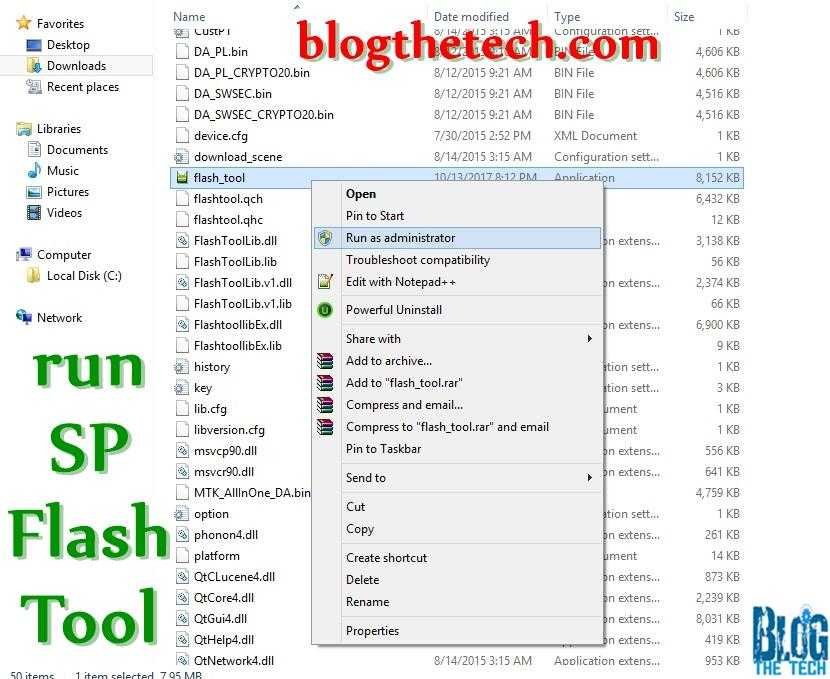
- Launch SP Flash Tool.
- Click on the Scatter file.
- Locate the scatter that comes with your smartphone Flash File.
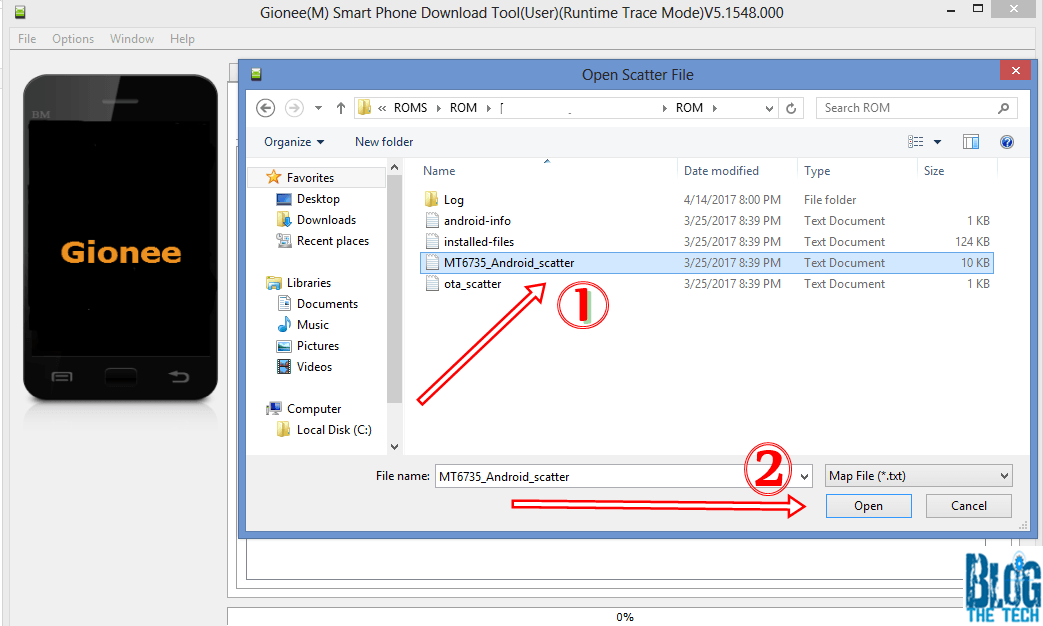
- Select the scatter file.
- Make sure to untick the preloader before flashing.
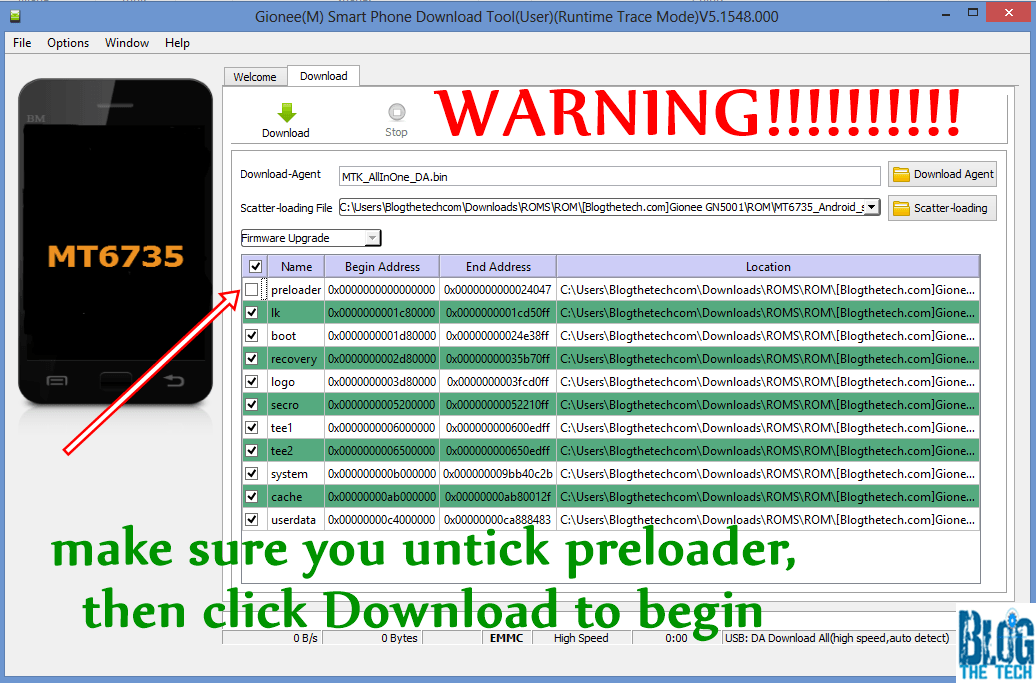
- Power off your phone and do not power it on.
- Click Download on the Smartphone Flash Tool.
- Plug into your phone with a detectable USB-Cord.
- Wait for it to finish flashing.

- Done, reboot your phone.
Take Note.
We are not going to be responsible for any harm that might come to your phone. Please, make sure you are flashing the right firmare, stock rom, or flash file to your smartphone.
Before flashing firmware or files, YOU are choosing to make these modifications, and if you point Your finger at us, we will laugh at you. [KIDDING.]
If the Smartphone Flash Tool didn't detect your smartphone, you might need to press the volume down or up button but do not power your phone.
If you don't install all the necessary drivers, you may experience issues detecting your phone with the PC.
There are many problems you might experience while trying to flash your smartphone with SP Flash Tool. You can Google them and find a solution, or you can drop a comment below for assistance.
