
- Aug 3, 2025
- 338
- 0
There are many Spreadtrum smartphones in the Android market, and your phone might be one of them.
Your phone might develop a problem, or you might see the need to make some modifications to your smartphone.
Today, I am going to tell you how to flash your phone with the Spreadtrum Upgrade Tool.
Spreadtrum smartphones' firmware comes in a PAC format, and for you to flash it to your phone, you are going to need the Spreadtrum Upgrade Tool.
Let me show you some important needs of flashing a stock firmware with the Spreadtrum Upgrade Tool.
The Need for the Spreadtrum Upgrade Tool
Requirements to Flash Your Smartphone With the Spreadtrum Upgrade Tool.
Follow the procedure below if you wish to flash your phone's stock ROM with the Spreadtrum Upgrade Tool
Flash Any Spreadtrum Firmware Using the Spreadtrum Upgrade Tool.
Please ensure you install all the necessary drivers; you may experience issues detecting your phone with the PC if you miss a single driver.
If you are flashing an MTK smartphone that comes with a scatter file, this is not for you; you can use the method below.
Learn how to flash the MTK smartphones.
Your phone might develop a problem, or you might see the need to make some modifications to your smartphone.
Today, I am going to tell you how to flash your phone with the Spreadtrum Upgrade Tool.
Spreadtrum smartphones' firmware comes in a PAC format, and for you to flash it to your phone, you are going to need the Spreadtrum Upgrade Tool.
Let me show you some important needs of flashing a stock firmware with the Spreadtrum Upgrade Tool.
The Need for the Spreadtrum Upgrade Tool
- Downgrade or Upgrade a Spreadtrum smartphone.
- Unbrick any smartphone.
- Unroot any phone.
- Fix Issues on your smartphone.
Requirements to Flash Your Smartphone With the Spreadtrum Upgrade Tool.
- A working, detectable USB Cord.
- Your smartphone firmware file.
- A Windows PC.
- A good battery backup.
- Spreadtrum Device Driver.
- Spreadtrum Upgrade Tool.
Note that flashing a firmware to your phone erases everything in your phone including contents on internal storage. It is always very advisable to backup your contents to an external storage or a PC. If your phone is bricked and can't be accessed, I guess there is nothing you can do.
Follow the procedure below if you wish to flash your phone's stock ROM with the Spreadtrum Upgrade Tool
Flash Any Spreadtrum Firmware Using the Spreadtrum Upgrade Tool.
- Download the Spreadtrum Upgrade Tool to your PC.
- Download your smartphone's Firmware.
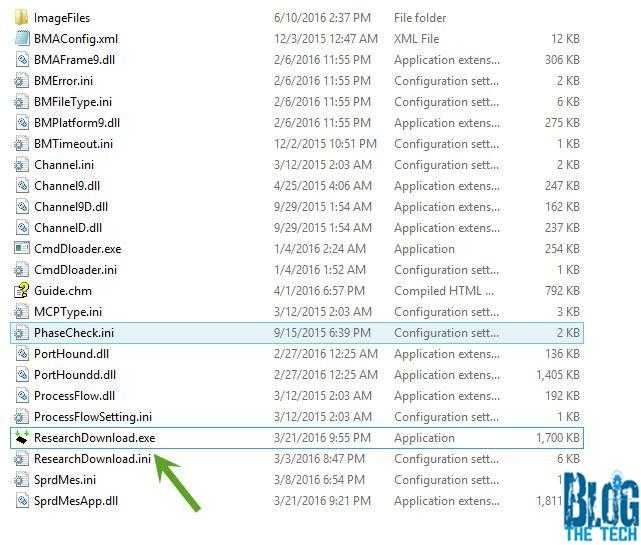
- Extract the Flash tool to your desired folder.
- Look for ResearchDownload and launch it.
- Minimise the Spreadtrum Upgrade Tool window.
- Locate the downloaded firmware ROM.
- Extract the file from the ZIP or RAR format.
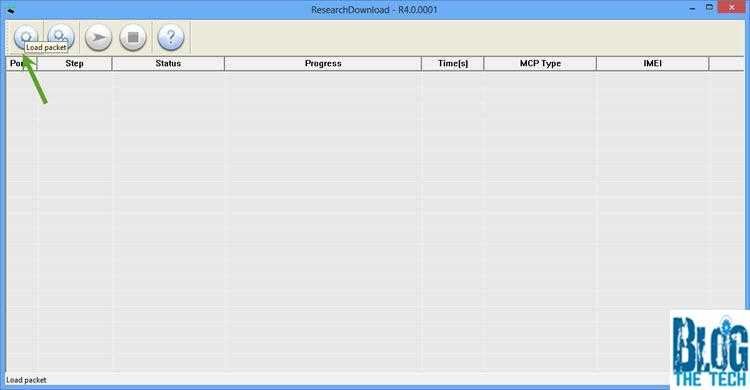
- Open the Spreadtrum Upgrade Tool.
- Click on Load Packet.
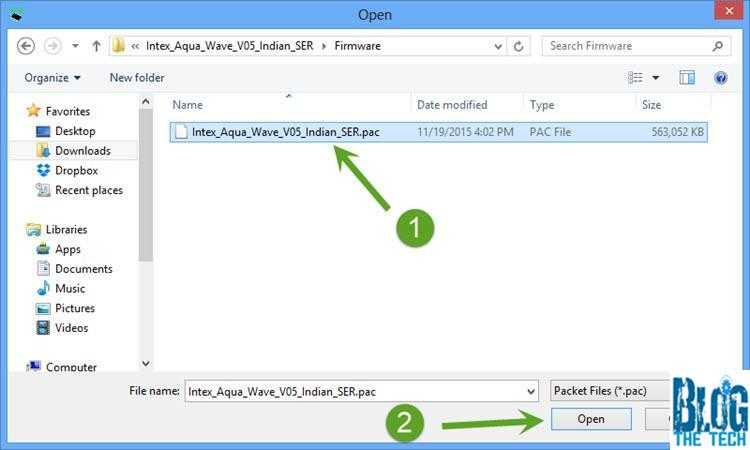
- Locate the PAC file in the extracted folder in your stock ROM folder.
- Select the file in the directory.
- Wait for it to load the files.
- Power OFF your smartphone.
- Connect your smartphone while it's off.
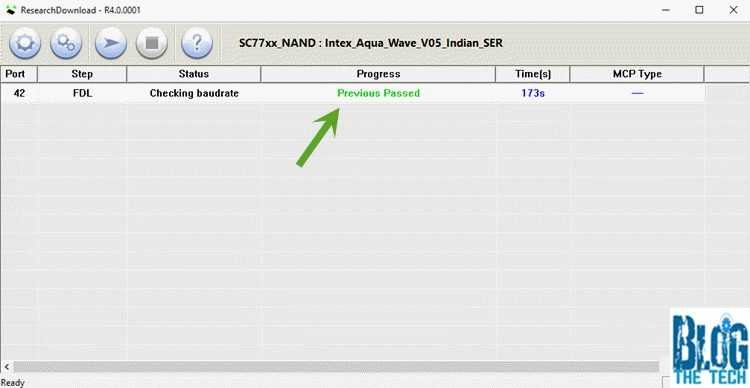
- Click on Start Downloading.
- You will see a green bar when it finishes flashing
- Done.
- Your phone might reboot in the process.
If you face any difficulty flashing firmware to your smartphone, please check whether you followed all the instructions and installed all the drivers properly..
Please ensure you install all the necessary drivers; you may experience issues detecting your phone with the PC if you miss a single driver.
If you are flashing an MTK smartphone that comes with a scatter file, this is not for you; you can use the method below.
Learn how to flash the MTK smartphones.
